![SCANIFLY-LOGO-Color-2022.jpg]](https://help.scanifly.com/hs-fs/hubfs/SCANIFLY-LOGO-Color-2022.jpg?height=40&name=SCANIFLY-LOGO-Color-2022.jpg)
⚠️This process outlines how to unlock your drone's software to allow it to fly, but this is separate from obtaining legal airspace permissions.
Unlocking the drone does not automatically grant you clearance. Always be sure to follow all local, regional, and federal laws. For more information on securing the proper flight authorizations, please refer to our guides on checking airspace and obtaining LAANC approvals.
Overview
When attempting to fly in restricted areas, DJI grounds their drones by soft-locking them. Historically, DJI had a much more complicated system for bypassing this. However, as of a recent 2025 update, DJI has implemented a simplified self-unlock process.
This guide outlines that updated process and applies to all DJI Fly drones (both with and without an integrated RC screen), as well as most other updated DJI models.
Step-by-Step Unlock Process
💡 How to connect your RC to Wi-Fi If you are using a DJI remote with an integrated screen, it operates similarly to an Android tablet. Simply swipe down from the top of the screen to access the Android quick settings menu, turn on Wi-Fi, and select your phone's hotspot from the list.
- Connect to a Hotspot: Start a Wi-Fi hotspot using your mobile phone, and connect your DJI remote control (RC) to it.
- How to connect your RC to Wi-Fi If you are using a DJI remote with an integrated screen, it operates similarly to an Android tablet. Simply swipe down from the top of the screen to access the Android quick settings menu, turn on Wi-Fi, and select your phone's hotspot from the list.
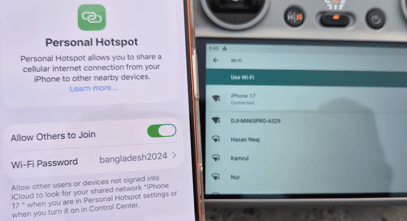
- How to connect your RC to Wi-Fi If you are using a DJI remote with an integrated screen, it operates similarly to an Android tablet. Simply swipe down from the top of the screen to access the Android quick settings menu, turn on Wi-Fi, and select your phone's hotspot from the list.
- Attempt to take off using the Auto-Takeoff button.
- (Button on the left that looks like a circle with an arrow pointing up inside of it)
- A pop-up will appear informing you of which Authorization Zone you are in.
- Note on Authorization Zones: DJI utilizes a GeoZone map system to keep airspace safe. When you enter an Authorization Zone, the drone requires a quick self-unlock procedure before it will allow the motors to start.
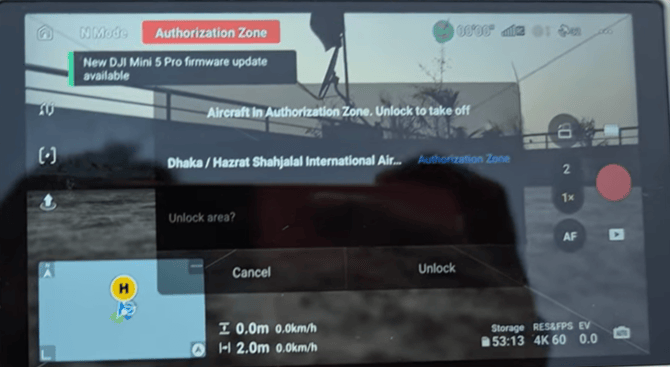
- Verify Your Identity:
- Enter your mobile phone number
- Check the box agreeing to the unlock conditions
- Tap Request button
- Enter the Verification Code: DJI will send you a text message with a code that you need to enter into the DJI RC.
- If the text message does not come through, request a voice verification. The voice verification will call you and tell you the code that you can enter to continue.
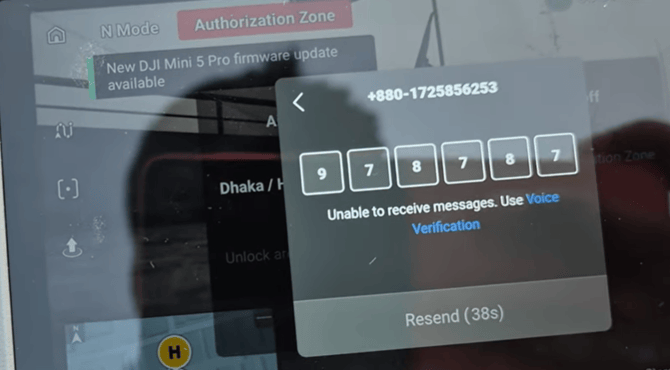
- If the text message does not come through, request a voice verification. The voice verification will call you and tell you the code that you can enter to continue.
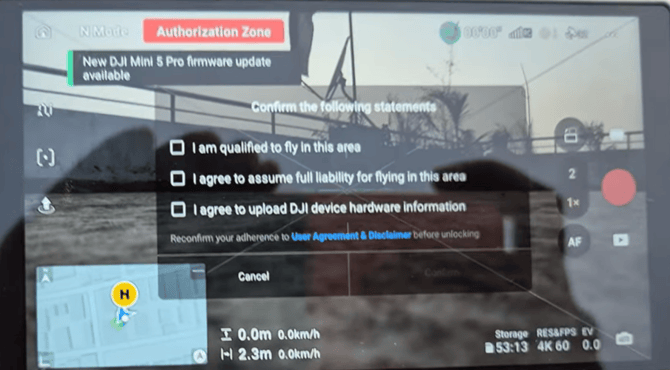
- Final Confirmation: Once you have confirmed with your code, check off the statements that pop up on the RC screen. You are now ready for takeoff!