![SCANIFLY-LOGO-Color-2022.jpg]](https://help.scanifly.com/hs-fs/hubfs/SCANIFLY-LOGO-Color-2022.jpg?height=40&name=SCANIFLY-LOGO-Color-2022.jpg)
What are Leads?
Leads in Scanifly are instant solar and roofing estimates for a specific address, collected in one place: the Leads table. Open Leads in the left navigation to see every lead you have generated.
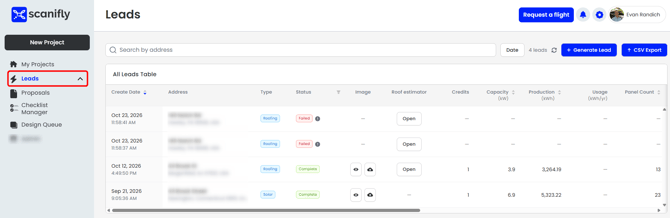
Creating a Lead in Scanifly
Generate a solar lead - Use this for a quick solar estimate- Go to Leads.
- Select Generate Lead.
- Type the property address. The address must be valid.
- (Optional) Set a kWh target to help determine the amount of solar the homeowner can have installed.
- Submit. The new lead is added to your table.
What is in your Lead?
|
Variable |
Description |
|---|---|
|
Create Date |
The date the lead was generated. |
|
Address |
The property address entered for the lead. |
|
Type |
Whether the lead is Solar or Roofing. |
|
Status |
Whether the lead finished (Complete) or did not (Failed). |
|
Image |
Visual of the solar modules on the roof - downloadable. |
|
Roof estimator |
Brings you to the Roof Estimator for that Lead to complete the proposal. |
|
Settings |
View the specific settings used for the Solar Estimator. |
|
Proposal |
Once you have generated a proposal based on the lead, you can view. |
|
Credits |
Credits used to generate the lead (1 if Google maps, 2 if Nearmap). |
|
Capacity (kW) |
Estimated size of the solar system. |
|
Production (kWh) |
Estimated annual energy production of the system. |
|
Usage (kWh/yr) |
Annual energy usage or target, when one was entered. |
|
Panel Count |
Number of panels in the estimated design. |
|
Weighted TSRF (%) |
Total Solar Resource Fraction: how much sunlight the roof receives after shading and orientation. Higher is better. |
|
Total Segment Area (sq ft) |
Total roof area used in the estimate. |
|
Imagery Date |
When the aerial imagery used for the estimate was captured. |
|
Imagery Type |
The source of the imagery (Google or Nearmap). |
|
Confidence Quality |
How reliable the estimate is, based on the recency of the data. |
|
Project Created |
The date the project was created, if the lead was converted. |
|
Converted to Project |
Whether the lead has been turned into a project. |
You are also able to API to this table! API support doc found here.