![SCANIFLY-LOGO-Color-2022.jpg]](https://help.scanifly.com/hs-fs/hubfs/SCANIFLY-LOGO-Color-2022.jpg?height=40&name=SCANIFLY-LOGO-Color-2022.jpg)
Where to find the settings
- Open your account settings menu (Gear Icon next to your name on the top right).
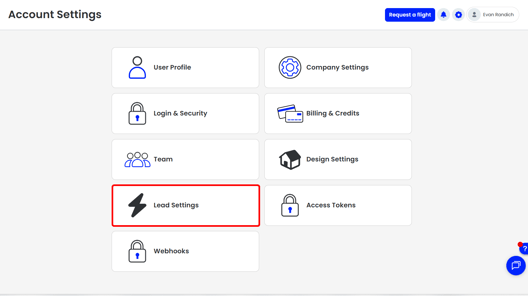
- Select Lead Settings.
- Under Industries, choose Roofing to adjust the Roof Estimator Settings.
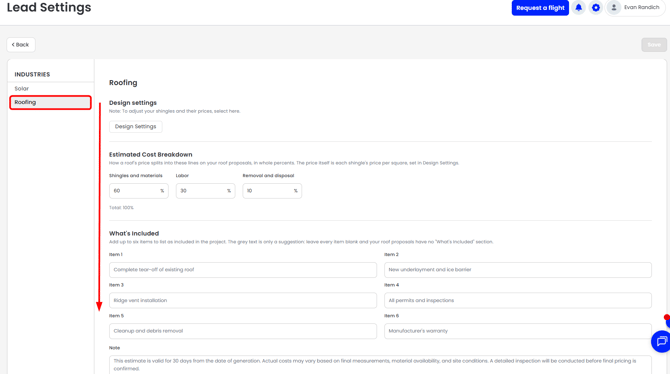
Design Settings
Select Design Settings at the top of the page to adjust the design settings used for your Solar Estimator.
Estimated Cost Breakdown
How a roof's price splits into these lines on your roof proposals, in whole percents. The price itself is each shingle's price per square, set in Design Settings. There are three factors in the Breakdown; Singles and Materials, Labor, and Removal and Disposal.
What's Included
Add up to six items to list as included in the project. If you leave every item blank, your roof proposals have no "What's Included" section. You can also leave a custom note in this section that replaces the standard terms (shown below) found at the bottom of the Roofing Estimate.

Homeowner message
Replaces the standard introduction under "Hello!" on the roof proposal. Leave blank to keep the standard text (shown below).

Example 3D model
Paste the 3D embed link of a solar project model in your area to showcase what you will do for the homeowner's property. You can find this link on the design card of any Scanifly project. Homeowners will see an example like this.
Company Logo or Hero Image
Upload an image that appears at the bottom of the 1-pager. It can be your logo, an image showing your equipment partners and certifications, or anything else you like. If nothing is uploaded, the 1-pager defaults to the company logo in your company settings page.
- Accepted formats: JPEG, PNG, or WebP
- Maximum size: 2 MB
- A wide image works best
Sales / Marketing Department Contact Info
This information will populate the 1 page quick quote output to indicate where prospects should reach out to you. This is typically a generic email and phone number or the person who leads your inbound efforts.
|
Field |
What to enter |
|---|---|
|
Contact |
Your business name, sales team, or the person who leads inbound |
|
Address |
Your business address |
|
|
Your business, sales team, or the person who leads inbound's email |
|
Phone |
A phone number the estimate recipient can reach you at |