![SCANIFLY-LOGO-Color-2022.jpg]](https://help.scanifly.com/hs-fs/hubfs/SCANIFLY-LOGO-Color-2022.jpg?height=40&name=SCANIFLY-LOGO-Color-2022.jpg)
What are Leads?
Leads in Scanifly are instant solar and roofing estimates for a specific address, collected in one place: the Leads table. Open Leads in the left navigation to see every lead you have generated.
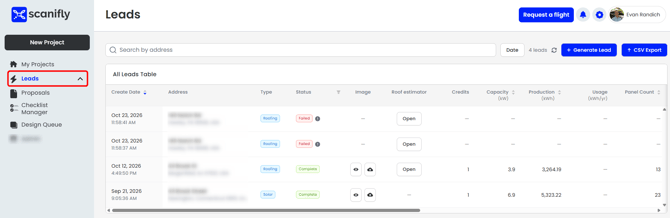
You are able to API to this table! API support doc found here.
Generating Leads in Scanifly
-
Solar Leads: See our article on the Solar Estimator to learn how you can easily generate Solar Leads/Estimates.
- Roofing Leads: See our article on the Roof Estimator to learn how you can easily generate Roofing Leads/Estimates.
What is in your Lead?
|
Variable |
Description |
|---|---|
|
Create Date |
The date the lead was generated. |
|
Address |
The property address entered for the lead. |
|
Type |
Whether the lead is for Solar or Roofing. |
|
Status |
Whether the lead finished (Complete) or did not (Failed). |
|
Image |
Visual of the solar modules on the roof - downloadable. |
|
Roof estimator |
Brings you to the Roof Estimator for that Lead to complete the proposal. |
|
Settings |
View the specific settings used for the Solar Estimator. |
|
Proposal |
Once you have generated a proposal based on the lead, you can download the proposal PDF. |
|
Credits |
Credits used to generate the lead (1 if Google maps, 2 if Nearmap). |
|
Capacity (kW) |
Estimated size of the solar system. |
|
Production (kWh) |
Estimated annual energy production of the system. |
|
Usage (kWh/yr) |
Annual energy usage or target, when one was entered. |
|
Panel Count |
Number of panels in the estimated design. |
|
Weighted TSRF (%) |
Total Solar Resource Fraction: how much sunlight the roof receives after shading and orientation. Higher is better. |
|
Total Segment Area (sq ft) |
Total roof area used in the estimate. |
|
Imagery Date |
When the aerial imagery used for the estimate was captured. |
|
Imagery Type |
The source of the imagery (Google or Nearmap). |
|
Confidence Quality |
How reliable the estimate is, based on the recency of the data. |
|
Project Created |
The date the project was created, if the lead was converted. |
|
Converted to Project |
Whether the lead has been turned into a project.
|
Lead Failure
If there is insufficient information to generate the lead, the status will read "Failed" in red text, and no credits will be used.
If you have any questions or need further assistance, please reach out to our chat support or email hello@scanifly.com.