![SCANIFLY-LOGO-Color-2022.jpg]](https://help.scanifly.com/hs-fs/hubfs/SCANIFLY-LOGO-Color-2022.jpg?height=40&name=SCANIFLY-LOGO-Color-2022.jpg)
Where to find the settings
- Open your account settings menu (Gear Icon next to your name on the top right).
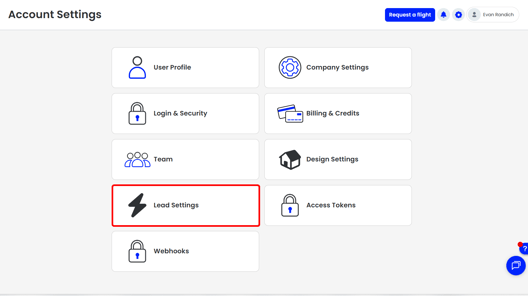
- Select Lead Settings.
- Under Industries, choose Solar to adjust the Solar Estimator Settings.
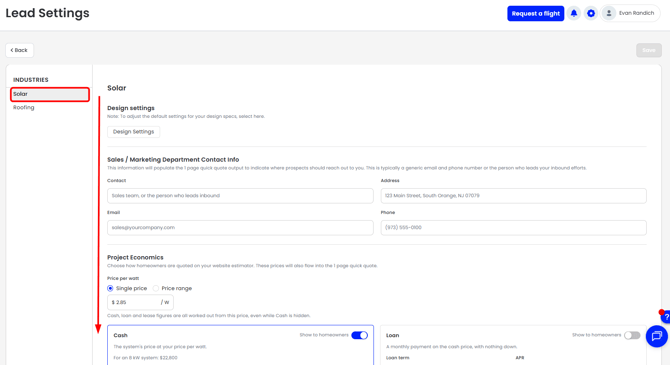
Currently, Solar is the default menu opened up when you click into Lead Settings
Design Settings
-
Select Design Settings at the top of the page to adjust the design settings used for your Solar Estimator.
Sales / Marketing Department Contact Info
-
This information appears on every Solar estimate so prospects know how to reach you. It is typically a generic email and phone number, or the person who leads your inbound efforts.
|
Field |
What to enter |
|---|---|
|
Contact |
Your business name, sales team, or the person who leads inbound |
|
Address |
Your business address |
|
|
Your business, sales team, or the person who leads inbound's email |
|
Phone |
A phone number the estimate recipient can reach you at |
Project Economics
-
Project Economics sets how homeowners are quoted on your website estimator. These prices also flow into the 1-page quick quote. You can show all four pricing options if you offer them, or just one.
-
Choose Single price or Price range, then enter your price per watt. Cash, loan, lease, and PPA figures are all worked out from this price, even while Cash is hidden.
-
Each option below has a Show to homeowners toggle. Turn it on only for the options you want recipients to see.
|
Option |
What the homeowner sees |
What you set |
|---|---|---|
|
Cash |
The system's price at your price per watt. For example, an 8 kW system at $2.85/W is $22,800. |
Nothing beyond the price per watt |
|
Loan |
A monthly payment on the cash price, with nothing down. |
Loan term (5-30 years) and APR % |
|
Lease |
A monthly payment for every $1,000 of the cash price. |
Monthly payment per $1,000 and lease term (5-30 years) |
|
PPA |
The system's yearly production at your price per kWh, by the month. |
Price per kWh |
Electricity Use
Enter what electricity costs homeowners in your area as a Utility rate ($/kWh). This standard rate is applied automatically to every Solar estimate generated.
With a rate set, the website estimator asks homeowners for their monthly electric bill and sizes the system to the yearly use it works out to, at the Target Offset in Design Settings. Leave it blank to fill the usable roof.
One Liner
A short note to the homeowner, placed underneath the estimator design image. Enter your message in the Message field (up to 250 characters).
Example 3D model
Paste the 3D embed link of a solar project model in your area to showcase what you will do for the homeowner's property. You can find this link on the design card of any Scanifly project. Homeowners will see an example like this.
Company Logo or Hero Image
Upload an image that appears at the bottom of the 1-pager. It can be your logo, an image showing your equipment partners and certifications, or anything else you like. If nothing is uploaded, the 1-pager defaults to the company logo in your company settings page.
- Accepted formats: JPEG, PNG, or WebP
- Maximum size: 2 MB
- A wide image works best
Example Solar Lead Estimate Showing Settings Configured
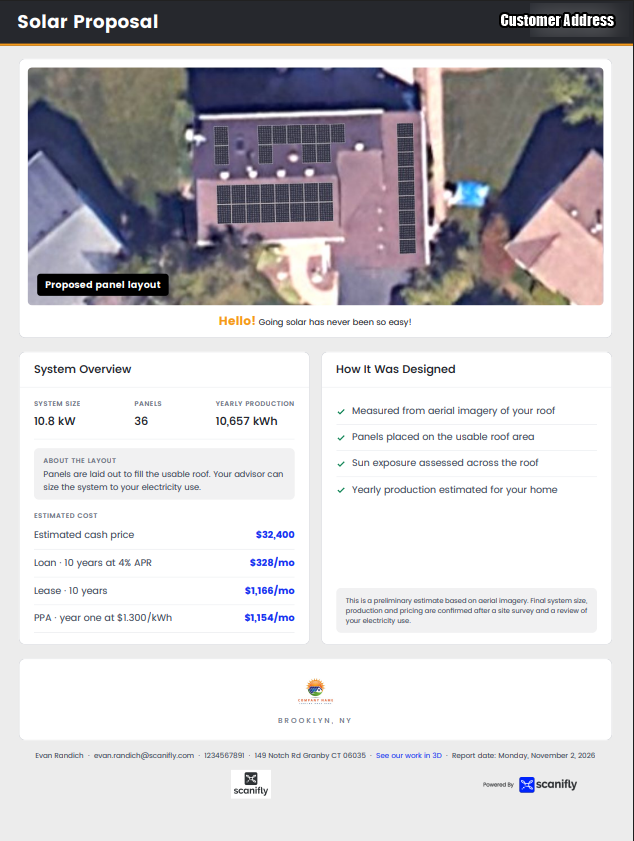
When you make any changes to your Solar Estimator Settings, make sure to click on the Save button in the top right corner!